

Resources | Human Resources
RESOURCES
| New Year’s Day Observed | Thursday, January 1, 2026 |
| Martin Luther King, Jr. Day | Monday, January 19, 2026 |
| Memorial Day | Monday, May 25, 2026 |
| Juneteenth | Friday, June 19, 2026 |
| Independence Day Observed | Friday, July 3, 2026 |
| Labor Day | Monday, September 7, 2026 |
| Thanksgiving Day | Thursday, November 26, 2026 |
| Administrative Closing | Friday, November 27, 2026 |
| Administrative Closing | Thursday, December 24, 2026 |
| Christmas Day | Friday, December 25, 2026 |
| Administrative Closing | Monday, December 28, 2026 |
| Administrative Closing | Tuesday, December 29, 2026 |
| Administrative Closing | Wednesday, December 30, 2026 |
| Administrative Closing | Thursday, December 31, 2026 |
| New Year’s Day Observed | Friday, January 1, 2027 |
-
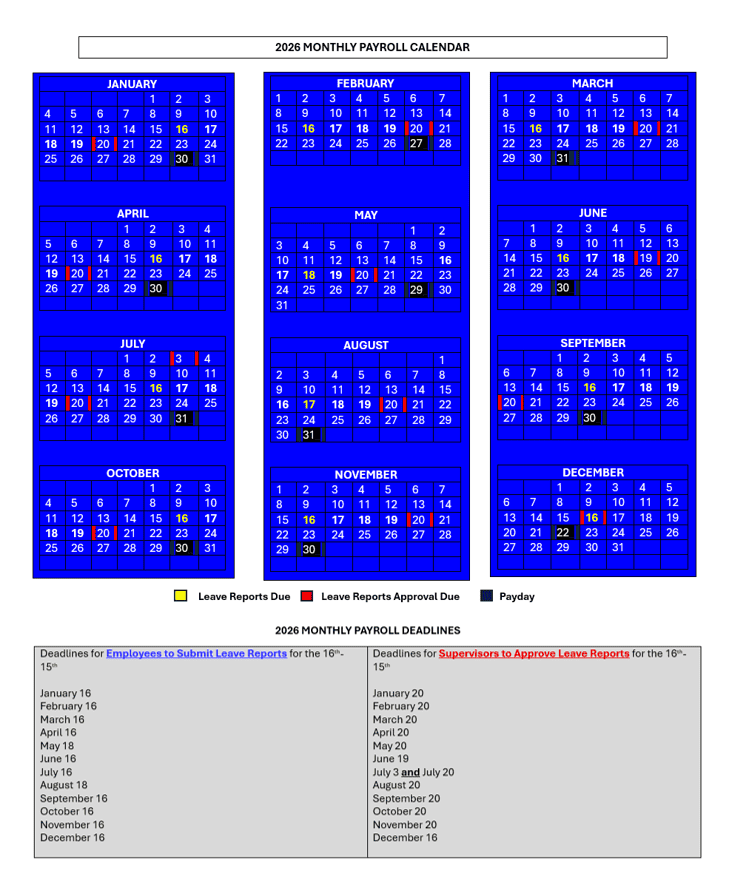
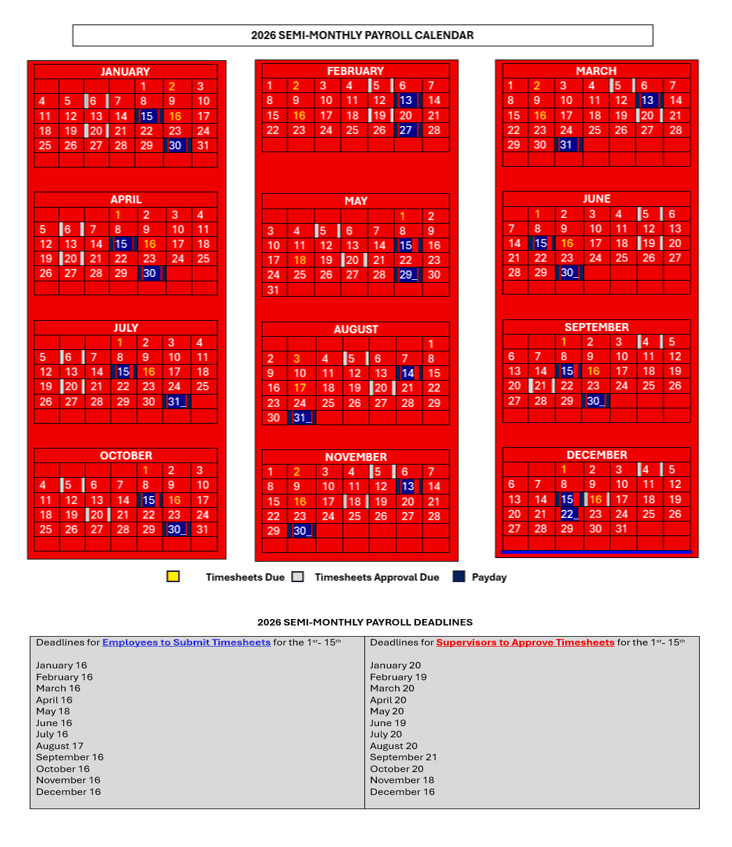
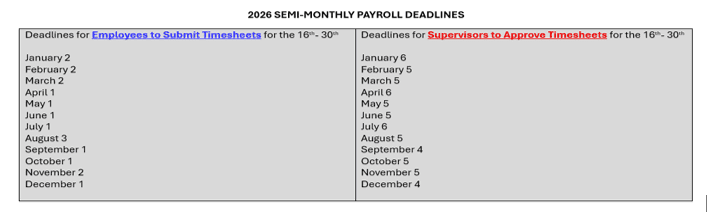
Employees must submit their timesheets on the stated due dates.
-
For monthly-paid employees , the pay period runs from the 16th of the previous month through the 15th of the current month. Leave reports are due the following business day after the pay period ends. NOTE: Requests for time off must be submitted and approved in advance of the current pay period.)
-
For semi-monthly paid employees , there are two pay periods each month, and the pay periods run from the 1st through the 15th of each month and from the 16th through the last day of each month. Timesheets are due the following business day after each pay period ends. NOTE: Requests for time off must be submitted and approved in advance of the current pay period.)
-
-
Supervisors must review and approve timesheets by the approval deadlines.
General
I am a new employee. Where do I go for Orientation?
New Employee Orientation is now online and must be completed within 31 days of your hire date. Available in the orientation are employee resources, policies and procedures, department links and benefits enrollment information. Upon completion, you are required to complete the Orientation Checklist.
As a new employee, how do I obtain my email address and credentials for computer access?
Once ALL new hire paperwork has been completed (Signed Contract, Background Check Form, I-9, W-4, Direct Deposit Form, Confidentiality Form, Employee Verification Form, *Designation of Beneficiary, *Orientation Checklist), you will be entered into Banner, where your user ID, email address and T Number will be generated. You will receive and email or a call from the Office of Human Resources within 24 to 48 hours with this information.
Items marked with a * are only required for “Permanent Contract” employees.
Where can I find the Personnel Handbook and the University Policy and Procedures?
The Personnel Handbook and the University Policy and Procedures can be found on the HR Homepage. On the right side of the page, you will find direct links to each, in addition to important information about the Tennessee Board of Regents and the State of Tennessee.
Where can I find resources to help me manage my employees?
The Manager’s Toolkit is available to all managers and supervisors. This site contains webinars, tools, templates, etc. that will aid you in consistently managing your team.
I recently got married. How do I update my personal information?
Congratulations! To update your personal information, please visit the HR Forms page and complete a Name Change form. Then submit it to the Office of Human Resources along with your new Social Security Card for payroll processing.
I forgot my password for MyTSU, how do I set up a new one?
If you forget your password, IT (x 7777) will reset it back to your T Number. Once you have successfully logged in using the T Number, you will be required to create your own password. Contact IT at x 7777 for further assistance.
Where can I find a holiday schedule?
Please visit the HR Holiday Schedule page for the current years schedule.
If I am hurt on the job, what should I do?
Effective Sept. 1, 2014, CorVel is the new Workers’ Compensation Third Party Administrator (TPA). If you experience a workplace injury, you need to report the injury to your supervisor immediately, and then both of you need to call the Nurse Hotline number – 866-245-8588.
If you experience a life threatening workplace injury, call 911 immediately. A nurse will assess your situation, and advise you what to do.
How do I find time sheets and when do we get paid?
Time sheets are distributed within departments to be completed and submitted to the Payroll Office by:
Exempt Employees – the 16th of the month; payment on the last business day of the month
Non-Exempt Employees – the 1st of the month for payment on the 15th; the 16th of the month for payment on the last business day of the month
Additional information regarding pay can be found on the HR Manager’s Toolkit page.
Where can I find direct deposit forms and w-4s?
These and other forms can be found on the HR Forms page.
Direct Deposit is required for all employees. Employees can also check their pay check data on MyTSU. Once you have logged in using your Username and Password click on Banner Services, Employee and Pay Information. You can then select Pay Stub, Deductions, leave accruals and direct deposit information.
How do I know what benefits I’m signed up for?
The first step to knowing what you are enrolled in is to review your Pay Stub. All Pay and Deduction Codes are listed on the stub. Additionally, a breakdown of your deductions can also be found my logging in to myTSU, Banner Services.
Where can I find coverage information for the medical, dental and vision plans provided by TSU?
All benefits coverage outlines can be found on the HR Benefits page.
Where can I look up information pertaining to the available Retirement plans?
Retirement information and persons to contact are found on the HR Benefits page. Please note that the same companies that are used for the ORP or used for the 403(b) retirement plans. For more information or to enroll, please contact the vendor listed.
Where can I find benefit enrollment and change forms?
All forms and reference materials can be accessed at the HR Benefits page. Once completed, please contact our Benefits Manager at x 7433 for submission.
When will my health insurance coverage be effective?
Health insurance coverage is effective the 1st of the month after your hire date.
How do I add a dependent to my insurance?
By completing an Add/Change Enrollment form within 60 days of the date a dependent is acquired. The “acquire date” is the date of birth, marriage, or, in case of adoption, the date the child enters the home. The Add/Change forms are available on the HR Benefits page. Once completed, please contact our Benefits Manager at x 7433 for submission.
How long can I cover my dependents?
Dependent children are eligible for coverage through the last day of the month of their 26th birthday. Proof of a dependent’s eligibility (birth certificates) will be required.
Can I change my health insurance coverage?
Typically only during Open Enroll (in the fall of each year). Employees have the option to transfer between health plans. The effective date for the change is January 1.
If I leave TSU, when will my insurance terminate?
Your insurance coverage will terminate the end of the month following your final paycheck. This may be different from the check you receive that pays out your Annual Leave.
If I leave TSU, what happens to my Sick Leave and my Annual Leave?
Sick Leave – Upon termination of employment, accumulated Sick Leave shall not be used as terminal leave, and the employee shall not be entitled to any lump sum payment for accumulated sick leave. If an employee is transferring to another state agency, his or her accumulated sick leave shall be transferred according to Leave Transfer between SBR Institutions and State Agencies. (See TBR Policy No. 5:01:01:06.)
TCRS member employees who terminate due to Retirement shall have all unused accumulated Sick Leave credited toward retirement.
Annual Leave – Employee will be paid in lump sum (exception granted for retirees) for any unused accumulation of Annual Leave except in a dismissal for gross misconduct as defined in TBR Policy 5:01:00:00 or transfer to another department of the State of Tennessee as outlined in TBR Policy 5:01:01:06.
How do I get a new ID card for my health/dental plan?
Employees may call their health plan provider or dental provider for replacement cards or visit their respective websites. Anytime a change is made new ID cards are issued by the health plan provider. Provider contact info and web addresses can be found on the HR Benefits page.
How do I file an insurance claim?
Insurance claims must be submitted directly to the health plan provider.
What is the Sick Leave Bank and how to I enroll in it?
The Non-Faculty and Faculty Sick Leave Banks were established to provide additional sick leave
to members who, due to serious illness or injury, have exhausted all of their personal sick leave
and annual leave.
The Non-Faculty and Faculty Sick Leave Banks are not administered by HR. The application should be submitted to the Staff/Faculty Senate’s Sick Leave Bank Administrator.
What is the application procedure?
Access the TSU online Career Site.
New Users select Search Postings to view current job openings. To apply for a job, select Create Application and follow the directions. Returning Users click Login and enter your user name and password to edit your existing application, apply to new jobs without reentering your application information and review of the status of positions you have applied to.
If I am an internal candidate, how do I apply to another position?
Go to the HR Employment page, Open Positions, Search Positions, Search. Once the open position appear, View the position you are interested in and click Apply For This Posting.
Who can I call if I have any questions about my application?
You may access your application and check the status of jobs you have applied to 24 hours a day, 7 days a week from a computer with Internet access by visiting the TSU online Career Site . If you do not have Internet access to a computer, the Office of Human Resources will assist you at the General Services Building, 1st floor.
How long is my application active?
The application is retained in a secure database until you remove it from the system. Your resume, however; is only maintained for the specific job in which you applied.
Are candidates notified if they are not selected for a position?
Candidates may check the status of any position they have applied to 24 hours a day, 7 days a week by visiting the TSU online Career Site.
Can I apply for any position, even if it is not announced?
No. You may only apply for jobs listed in the Search Postings section of the TSU online Career Site .
Can I also send my resume to the Office of Human Resources?
No. All applications and resumes should be submitted through the TSU online Career Site system for review.
What do I do if I have forgotten my password to the TSU online Career Site?
To have your TSU online Career Site password reset, please contact the Office of Human Resources at x 5281.
ADA Accommodations
Reasonable Accommmodation for TSU Employees
Information to know about the Law and University Policy
It is the policy of Tennessee State University (“TSU” or “University”) to provide equal access to education and employment to all, regardless of disability. TSU fully complies with all laws, orders, regulations and policies promulgated for promoting and ensuring equal opportunity for persons who may have a disability, including the Americans with Disabilities Act and the Rehabilitation Act of 1973.
Under TSU Procedure No. 6.6.1, it is the expressed policy of the University that discrimination or harassment based upon a disability is prohibited. If an applicant for employment, employee, student, or applicant for admission believes s/he has been discriminated against or harassed because they have a disability, they should contact the Office of Institutional Compliance (OEI) at 615-963-7435 or visit our office in the McWherter Administration Building, Suite 260.
OVERVIEW OF DISABILITY LAWS
Americans with Disabilities Act
The Americans with Disabilities Act (“ADA”) prohibits discrimination on the basis of disability in employment in state and local governments, several different types of businesses and public institutions such as TSU.
To be protected by the ADA, one must have a disability or have a relationship or association with an individual with a disability. An individual with a disability is defined by the ADA as a person who has a physical or mental impairment that substantially limits one or more major life activities, a person who has a history or record of such an impairment, or a person who is perceived by others as having such an impairment. The ADA does not specifically name all of the impairments that are covered.
Title I of the ADA requires employers with 15 or more employees to provide qualified individuals with disabilities an equal opportunity to benefit from the full range of employment-related opportunities available to others. For example, it prohibits discrimination in recruitment, hiring, promotions, training, pay, social activities, and other privileges of employment. It also restricts questions that can be asked about an applicant’s disability before a job offer is made.
The ADA also requires that employers and entities that received federal financial assistance make reasonable accommodation to the known physical or mental limitations of otherwise qualified individuals with disabilities, unless it results in undue hardship. At TSU, reasonable accommodations have been and will continue to be made to the extent possible for qualified disabled personnel. These accommodations are applicable to all phases of employment including recruitment, hiring, transfer, and training.
If a qualified applicant or qualified employee with a disability desires a reasonable accommodation at TSU, he or she should complete the Employee ADA Reasonable Accommodation packet and then contact the Office of Human Resources at 615-963-7543.
DISABILITIES SERVICES AT TSU
ADA or Section 504 Reasonable Accommodations for TSU Employees
Employees who seek reasonable accommodations due to a disability should email ADA Accommodations.
Please access the Reasonable Accommodation Request Form for more information and to begin the process.
Competitive Total Rewards Packages
In seeking to attract and retain the best talent, Tennessee State University offers competitive total rewards packages while recognizing top performers for their outstanding contributions to the University.
All positions are classified according to relative job requirements and responsibilities. Each job classification is assigned an appropriate skill level. All jobs are paid within a salary range. Information on the salary range for your job classification may be obtained from your supervisor or the Human Resources Office. Usually, new employees are paid at the beginning of the applicable salary range. If salary increases are awarded, such increases are usually approved annually and are usually effective at July 1. There is no guarantee or assurance of salary increases since all increases are based on the state appropriation and other relevant factors regarding the operation of the University.
Employee Payroll
Direct Deposit Stubs:
Direct deposit stubs will be emailed 2 business days before the scheduled pay date. For example, those for the payroll scheduled for June 30th, will be emailed on June 28th.
A full listing of Pay Stub Pay and Deduction Codes can be found here. A breakdown of your deductions can also be found my logging in to myTSU, Banner Services.
Re-issuing Stubs and Direct Deposits:
Direct deposit information can be obtained at myTSU, which is usually updated two days prior to payday. If a direct deposit stub is not received via email, a replacement copy can be printed from this web site. If a direct deposit is not received, a manual or electronic replacement can be requested from the Payroll Office.
Early Payrolls:
A payroll that falls on a federal holiday that the University does not observe will be scheduled for the previous work day. Another early payroll will occur in December two days before the University closes for the holidays. For example, if the University administratively closes effective December 25th, the scheduled pay date will be December 23rd.
Student Payroll
All College Work Aid student employees will be paid by direct deposit. Students in the College Work Study program are also encouraged to be paid by direct deposit. The Placement Office will collect the direct deposit forms for students in the College Work Study program. Supervisors of students in the College Work Aid Program will need to collect the direct deposit forms from them (at the same time that I-9 documents and W-4’s are collected).
If the students assigned to your areas have questions, more information is available to assist them. It will also soon be posted on the Bursars Office website and has been provided to The Meter. Your assistance in getting this information to your student employees and their supervisors is greatly appreciated.
You may review your pay stub through the web via myTSU. We require all new employees to sign up for Direct Deposit of their pay.
Tax Documents
View W-2 document (for income tax filing)